Shimmering Sales: The Holographic Editable Gift Certificate Strategy
You have poured your heart and soul into your business, perfecting your product and building a community of loyal fans. It is a fantastic position to be in until a customer asks for a gift certificate for their friend's birthday, and you realize you are completely unprepared. Handing over a hastily scribbled note on a scrap of paper does not exactly scream "professional brand." What you need is a solution that is not only beautiful and functional but also instantly available. This is where the magic of a modern, editable gift certificate comes in, transforming a potential logistical headache into a powerful branding and sales opportunity.
Beyond the Basic Voucher: What Makes This Template Special?
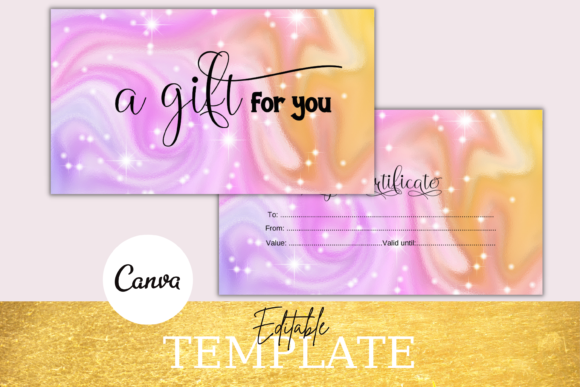
Forget the generic, cookie-cutter gift cards of the past. The Holographic Editable Gift Certificate template is designed for the contemporary small business owner who understands that every customer touchpoint is a chance to reinforce their brand identity. The standout feature is, of course, the holographic effect. This iridescent, color-shifting finish instantly communicates value and modernity. It catches the light and the eye, making the certificate feel less like a simple piece of paper and more like a premium, sought-after gift. This visual appeal is crucial for social media shareability. Imagine a customer posting a photo of the shimmering card they received; it acts as organic, visually-driven marketing for your brand.
But its beauty is matched by its complete customizability. This is not a static PDF you have to print as-is. The entire template is hosted on Canva, a free and user-friendly design platform. This means you have full creative control. You can upload your own logo, ensuring the certificate is unmistakably yours. You can adjust every single piece of text, from the "To" and "From" fields to the value and terms. Change the font to match your brand's typography, tweak the colors to align with your palette, and move elements around until the layout is perfect. You are the designer, and you do not need to wait for anyone to do it for you. The process is instant, giving you the power to create and print a professional-grade gift certificate in minutes, not days.
Practical Applications for Your Growing Business
The true value of this editable gift certificate template lies in its versatility. It seamlessly integrates into various aspects of your business operations and marketing strategy. For a service-based business like a salon, consulting firm, or yoga studio, it is the perfect way to sell future sessions. For a product-based business like a boutique, artisan shop, or online store, it drives new customer acquisition and guaranteed future sales.
Consider these practical uses:
- Seasonal Promotions: During holidays like Christmas, Valentine's Day, or Mother's Day, gift certificates are a top seller. A professionally designed, holographic option stands out from the competition.
- Customer Appreciation: Offer a beautifully branded gift certificate as a thank-you for a large purchase or as part of a loyalty program.
- Contest and Giveaway Prizes: A high-value gift certificate is an attractive prize that costs you the wholesale price of your product or service, making it a cost-effective marketing tool.
- Last-Minute Gifting: Many customers seek instant solutions. You can offer digital delivery of the customized certificate, providing an immediate solution for procrastinators and capturing a sale you might otherwise lose.
The ability to add your logo is a critical feature for brand consistency. Every certificate that leaves your business, whether printed on high-quality cardstock or sent as a digital file, reinforces your visual identity. This consistency builds trust and makes your brand more memorable. Furthermore, the variety of included sizes—3.5x2.5 inches, 3.5x2 inches, and others—allows you to choose the format that best suits your needs, whether it is a standard business card size for easy storage or a larger format for a more impactful presentation.
Aligning Design with Your Brand's Personality
Typography and design elements are not just decorative; they are communicative. The style of the gift certificate you choose sends a message about your brand. The modern, sleek feel of a holographic effect might be perfect for a tech startup, a contemporary fashion brand, or a trendy cafe. It suggests innovation, quality, and a forward-thinking mindset. If your brand has a more rustic, earthy, or artisanal vibe, you might use the editable template to soften the effect, perhaps by using a kraft paper texture as a background (a popular choice for DIY gift certificates) and pairing it with a handwritten or script font.
This is where the power of editing in Canva truly shines. You are not locked into one aesthetic. You can create a suite of design assets that all feel cohesive. Your gift certificate can use the same premium font and color scheme as your business cards, social media graphics, and website. This level of visual consistency is a hallmark of a professional brand identity. It tells customers you pay attention to detail, which translates to trust in the quality of your product or service. Think of the certificate as a small piece of your brand's story, a tangible item that represents the value you offer.
A Step-by-Step Guide to Instant Customization
The process of creating your perfect gift certificate is designed to be incredibly straightforward, even if you have no prior design experience. Once you purchase the template, you will receive a document with a direct link to the Canva template. Simply click the link to open it in your free Canva account.
- Access the Template: Click the provided link. Canva will prompt you to create a copy of the template, which saves it directly to your own Canva dashboard. Your original template remains untouched.
- Upload Your Brand Assets: In the left-hand panel, navigate to "Uploads" and drag in your logo file (PNG format with a transparent background is ideal).
- Edit the Text: Click on any text box to change the wording. You can write in your company name, the certificate's value, a unique code, and any terms and conditions. Use the toolbar at the top to change the font style, size, color, and alignment.
- Adjust the Design: Move elements around to perfect the layout. You can change the background color, add additional text boxes, or even incorporate other design elements from Canva's library.
- Download for Printing or Digital Use: Once you are satisfied, click the "Share" button in the top right, then "Download." For printing, choose the PDF Print format for the highest quality. For emailing to a customer, a PNG or JPG file works perfectly.
This self-editing model puts you in the driver's seat. There is no back-and-forth with a designer, no waiting for revisions. You have the freedom to experiment and create a gift certificate that truly feels like an extension of your brand, ready to be printed and sold the very same day.